PitStop Pro PDF editor and preflight PitStop Pro - Edit PDF and preflight PDF software

PitStop Pro PDF editor and preflight

The industry standard for PDF preflight, auto-correction and editing

Buy
Upgrade

PitStop Pro 11 update 2 - Get your free update to the latest version (v. 11 users only)

Higher efficiency, smarter functionality, easier integration

As a publishing professional, you know that PDF files can be troublesome to work with.They are not generated as expected, do not output as expected and more often than not you have to edit the PDF even though Adobe Acrobat does not support it.

PitStop Pro now brings you a plug-in for Adobe Acrobat that offers the solution to those problems. From now on editing a PDF will be a piece of cake!

Impressive array of PDF editing tools

PitStop Pro comes with an impressive array of PDF editing tools:

  • Edit text
  • Move colors
  • Move, rotate or scale objects
  • ...

Fixing last-minute problems is now a mere matter of seconds. Even when the problem is more complicated or production oriented, PitStop Pro still has the right tool for the job.

Imagine being able to apply a template with correct trim and bleed boxes to a PDF document while at the same time inserting the printer marks you want.

PitStop Pro was developed specifically for use in a demanding, deadline-driven professional publishing environment. It won't let you down when a deadline looms and you have to fix things quickly and efficiently.

Edit PDF inspector
Preflight PDF software

Global changes to the rescue

When working with long documents or to fix problems across a number of pages in a PDF file, global changes come to the rescue.

Each global change can be customized to do exactly what you need and accomplishes changes automatically across a complete PDF file.

  • Apply stamps
  • Insert cover pages
  • Renumber pages
  • Convert all colors

  • ... all done in just seconds.

The built-in industry-standard PDF preflight engine checks all aspects of your PDF files to detect missing or corrupt fonts, incorrect colors, objects without bleed and much more…

It supports standards such as PDF/X, the Ghent PDF Workgroup specifications and the profiles created by your user association, publisher or printer. You can generate a full preflight report that lists all problems found in your files or you can choose to use the navigator to pinpoint the exact error object. The navigator can often even fix the problems for you.


Edit PDF Global Changes

Preflight PDF: specialized PDF preflighting software

Smart Preflight PitStop Pro

Smart Preflight

PitStop Pro 11 introduces Smart Preflight & Correction - a more accurate and flexible way of preflighting and correcting PDF files to their specific production requirements.

Read more

Accurate detailed preflight information

When it's important to know for sure that a particular PDF file has been preflighted and by whom, the open, standards-based Certified PDF technology embedded in PitStop Pro comes in handy.

It embeds the results of the preflight in the actual PDF file and certifies the file with a standard digital signature. Never doubt the quality of the files you receive or waste time unnecessarily preflighting incoming files again.

In short, whatever problems you may face with troublesome PDF files, PitStop Pro preflight software helps you fix them quickly and efficiently without ever leaving Adobe Acrobat.


embed missing fonts in a PDF

Embed missing fonts

Don’t let missing fonts hold up your job! Embed fonts in PDFs with Enfocus’ flagship solution, PitStop Pro.

convert fonts to outlines in PDF

Convert fonts to outlines

When you need to play it safe: convert fonts to outlines in PDFs using Enfocus PitStop!

changing fonts in a PDF

Changing fonts in a PDF

Simply select the font you’d like to replace, and change the font in your PDF!

editing text in a PDF

Editing text in a PDF

No need to back to the design application. With PitStop Pro you can edit text in the PDF.

cutting and pasting between PDF's

Cut & paste text between PDF's

Cut & paste PDF, as well as PitStop’s other “layout” functions, give you an easier time of editing and repurposing all of your image assets.

resizing and reflowing text in PDFs

Resize and reflow text and images

PitStop Pro makes resizing PDF text and PDF text reflow possible in a PDF.

convert image color space in a PDF

Convert image color space

If images in a PDF are in the wrong color space, PitStop can convert them for you.

crop resize and move images in PDF's

Crop resize and move images

PitStop allows you to crop, resize, and move images within a PDF.

place images in a PDF

Place, replace and remove images

With PitStop Pro you can insert, change, and remove images inside a PDF.

Add or remove printer marks in a PDF

Add printer marks & page numbers to a PDF

Add printer marks or page numbers to your PDF with ease.

Check the image resolution in a PDF

Check the image resolution in a PDF

With PitStop Pro you can check if the resolution of the images in the PDF is high enough for its purpose.

Convert RGB images to CMYK in a PDF

Convert RGB images to CMYK in a PDF

Check if RGB images are present in a PDF file and automatically convert these RGB images to CMYK within Acrobat.

Detect and convert spot colors to CMYK

Detect and convert spot colors to CMYK

Convert spot colors to CMYK and vice versa in Acrobat.

Knockout white text in a PDF

Knockout white text in a PDF

Check if white elements are set to overprint and automatically fix them, so they knock out.

New features covered in PitStop pro 11 update 2:

Support for Adobe Acrobat XI Standard or Pro

PitStop Pro now officially supports this new version of Adobe Acrobat.

Support for Microsoft® Windows® 8

PitStop Pro now officially supports this operating system from Microsoft, both 32-bit and 64-bit running in 32-bit mode.

New ‘Fix’ Preflight Profiles to support the GWG2012_CMYK specification

With the previous version of PitStop Pro we announced support of this new specification and released a set of Preflight Profiles that verified the standard. With this version we add an additional set of profiles that will also fix PDF files to become compliant with the standard, where possible.

More information regarding the GWG and the new specification can be found on the GWG website: http://www.gwg.org/GWG_2012_Version.phtml

Polish language support

PitStop Pro is now available in Polish.

Standard ICC profiles are now included in the installer

When PitStop Pro is installed, we now also include as part of the installation process some standard ICC profiles from the ECI, Idealliance and WAN-IFRA. More information on these profiles and their recommended use can be found on the following links:

www.eci.org
www.wan-ifra.org
www.idealliance.org

New Global Change – Split Pages in Half

This new Global Change allows the user to split PDF pages in half, either vertically or horizontally. The change also recognizes the current page geometry and duplicates it on the newly split edges so the new pages are centered within the existing page geometry.

pitstop-pro-update-2-b

There are options to configure which page box defines the page size and also options for working with multi-page documents. This option will be particularly useful to those users who receive documents as double page spreads and require a single PDF page for their workflow.

New Action – Split Pages in Half

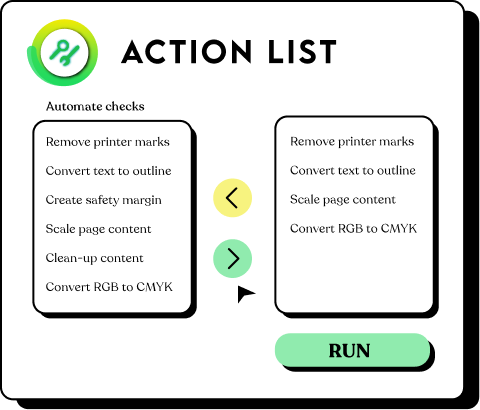
This new functionality is also available as an Action as well as a Global Change. This enables users to define their own requirements for splitting pages based on Action List selections and of course variables using the Smart Preflight functionality.

New predefined Action Lists

Using the ‘Split Pages in Half’ Action, we have created 3 new pre-defined Action Lists to split pages for 3 commonly used page sizes: A4, A5 and US letter. These Action Lists have similar functionality to the Global Change, but are based on the page width of the trim box and split the pages vertically; they are designed for working with pages supplied as spreads. These Action Lists also have the added functionality of cropping any excess image data after the pages have been split.

Smart Preflight with page based Actions

The Actions ‘Select by Page Size’ and ‘Check Page Size’ now support Smart Preflight and can be driven by variables.

Tolerance for Page Size Check in Preflight Profile Editor

The check for page size in the Preflight Profile Editor now has a user definable tolerance. This check had a tolerance previously but it was hardcoded, now it can be defined by the user and even driven by Smart Preflight.

New Preflight Report Style – ‘Scaled Low Resolution Annotated Report (max A4)’

This has been requested by customers who work with physically large files such as those used in large format printing. This report style makes a low resolution A4 version of the annotated report that can be emailed; because of the large size of the original file, annotated reports were too large in file size to allow this, before now.

Action Lists can be turned on and off in the Preflight Profile Editor

It is now possible to load multiple Action Lists into the Preflight Profile Editor and control by a check box if the Action List should run or not.

pitstop-pro-update-2-c

Smart Preflight - Action Lists in the Preflight Profile Editor can be controlled by a Boolean variable.

As an extension to this new functionality the decision on whether an Action List should run or not can also be controlled by a variable, so an automated decision can be made which Action Lists should be used at which time.

pitstop-pro-update-2-d

Action Lists can now be edited directly in the Preflight Profile Editor

There is now a new button that allows you to edit an Action List directly in the Prefight Profile editor without having to export and import the Action List back into the Action List panel.

If you use this feature, you should remember that you are only editing the Action List in the Preflight Profile, if you have a duplicate of the Action List within the Action List panel, that will not be updated.

Smart Preflight - Constant variables now support drop-down lists

When Smart Preflight was used within PitStop Pro, for Constant variables the user was asked to type in a set of values which were then used within the Preflight Profile or Action List. Users told us this was not ideal due to human error and lack of knowledge, therefore we have extended this functionality allowing the creator creator of the Variable Set to provide a list of predefined values for the user to choose from.

There is still an option to allow manual entry, but the drop-downs open up more opportunities for Smart Preflight, especially with non-technical users. Constant variables with drop-down lists are also supported within the Rule Based Variables and the Variable Set Debugger.

pitstop-pro-update-2-a

Smart Preflight – Variable Sets can now be locked and encrypted

Just as Preflight Profiles and Action Lists can be protected, so now can Variable Sets. The locking does not prevent the Variable Set from being loaded and used, but it does protect the Variable Setup from being edited or copied.
Locked Variable Sets will only work with PitStop 11 update 2 and above.

Smart Preflight – New updated sample Preflight Profile and Variable Set

The standard Variable Set and Preflight Profile that are installed to demonstrate Smart Preflight within PitStop Pro have been updated to showcase the potential of the above new functionality and provide a simple and easy demonstration of Smart Preflight.

What's new in PitStop Pro 11:

PitStop Pro 11 introduces Smart Preflight & Correction – a flexible way of preflighting and correcting files to their specific production requirements.

Smart Preflight PitStop Pro Until today, a Preflight Profile could only contain fixed checks and corrections e.g. the resolution of an image must be higher than 300 dpi or the page size should be A4. However, every job is different and comes with its specific order and production requirements.

The current situation requires many different or very general Preflight Profiles that can be used for different types of jobs, but this results in less specific and accurate preflighting and corrections.

Not anymore with PitStop Pro 11. Users no longer have to work with fixed values within a Preflight Profile, but can use preflight rules that can now depend on job and production specific information. Smart preflight unleashes the full potential of checking and correcting PDF files within the PitStop Preflight engine.

PitStop Pro 11 introduces the concept of 'Variable Sets' – a group of variables to be used when preflighting or correcting PDF files. These variables are substituted at runtime with the right values for the job.

Smart Preflight is more powerful by being specific and accurate for each job, resulting in higher quality PDFs. The new version of PitStop Pro enables you to maximize the technology you already own and know today by using it in a smarter way.


Smarter Text Editing
Find and Replace text
The new Find and Replace text tool allows users to quickly locate specific text segments and immediately replace them. For example, you can easily correct misspellings globally, apply new branding styles, and more. These changes can be easily implemented and are quickly and efficiently handled saving precious time.

Merge characters and words into text lines.
PitStop Pro makes smart text manipulation easy with a new tool to automatically remerge split text segments into a single line. This new feature eliminates the struggle to work with separate text segments and provides a more comfortable way to correct mistakes, edit and reposition text.

Cleaner overview, a better focus

Improved Preflight Profile Editor
Enfocus has developed a new and streamlined interface to make Preflight Profile editing as easy and obvious as possible in PitStop Pro 11. The Preflight Profile Editor has been optimized with more logical categories. Now you can add your desired preflight checks and have a clear visual overview of the checks and corrections that are used in your Preflight Profile.

Streamlined Navigator
The Navigator, PitStop Pro's mission control, is more compact and easier to use resulting in a clearer view of your PDF throughout the review process.

Benefits: Be effective - be smart
  • Use preflight rules based on job and production specific information to preflight and correct in a more accurate and in-depth way.
  • More flexibility, ability to use different conditions without losing time.
  • Use smart text editing to update or correct your PDF files.
  • Maintain a better overview through the improved Preflight Profile Editor and Navigator.
  • Reduce errors and standardize processes to save time and money, and to increase quality.
  • PitStop Pro 11 is a new start to a Smart future.


  PitStop Server
PitStop Server 11 introduces Smart Preflight & Correction – a flexible way of preflighting and correcting PDF files to their specific production requirements.

Learn more about PitStop Server

PitStop Pro Documentation Reference Guide

Web HelpHTML Documentation Reference Guide (English)
Web HelpHTML Documentation Reference Guide (French)
Web HelpHTML Documentation Reference Guide (German)
Web HelpHTML Documentation Reference Guide (Dutch)
Web HelpHTML Documentation Reference Guide (Spanish)
Web HelpHTML Documentation Reference Guide (Italian)
Web HelpHTML Documentation Reference Guide (Japanese)
Web HelpHTML Documentation Reference Guide (Chinese)

PitStop Pro Documentation Quick Start Guide

Web HelpHTML Documentation Quick Start Guide (English)
Web HelpHTML Documentation Quick Start Guide (French)
Web HelpHTML Documentation Quick Start Guide (German)
Web HelpHTML Documentation Quick Start Guide (Dutch)
Web HelpHTML Documentation Quick Start Guide (Spanish)
Web HelpHTML Documentation Quick Start Guide (Italian)
Web HelpHTML Documentation Quick Start Guide (Japanese)
Web HelpHTML Documentation Quick Start Guide (Chinese)

PitStop Workgroup Manager Documentation User Guide

Web Help HTML Documentation User Guide (English)
Web Help HTML Documentation User Guide (French)
Web Help HTML Documentation User Guide (German)
Web Help HTML Documentation User Guide (Dutch)
Web Help HTML Documentation User Guide (Spanish)
Web Help HTML Documentation User Guide (Italian)
Web Help HTML Documentation User Guide (Japanese)
Web Help HTML Documentation User Guide (Chinese)

Extra

Web Help PitStop Report Template(English)
Web Help PitStop Preflight Report Help(English)

Quick Start Guide

Reference Guide

Read Me

Workgroup Manager

Extra

License agreement

System requirements PitStop Pro 11 update 2:

Minimum 512 MB of RAM (2GB recommended)
1.024x768 screen resolution (1280 x 1024 recommended)
Adobe® Acrobat® 8.x Standard or Pro
Adobe® Acrobat® 9.x Standard or Pro
Adobe® Acrobat® X Standard or Pro
Adobe® Acrobat® XI Standard or Pro

Supported operating systems

Microsoft® Windows® XP SP2 Professional or Home Edition
Microsoft® Windows® 7, Home Premium, Business or Ultimate Edition
(32-bit and 64-bit, running in 32-bit mode)
Microsoft® Windows® 8, (32-bit and 64-bit running in 32-bit mode)

Mac OS® X 10.6
Mac OS® X 10.7
Mac OS® X 10.8

For the system requirements for previous PitStop Pro versions click here.


Products


PitStop Pro: PDF Editing & Preflight


Support


Find a reseller


Solutions


Enfocus company


Enfocus online store

Free software trials


Buy online


Upgrade to the latest version