Speed up your Switch flow by disabling PitStop Server's troubleshooting datasets

When throughput matters, a single PitStop Server setting can help your Switch flow process jobs more efficiently. By disabling troubleshooting datasets in stable production environments, you can reduce processing overhead and memory usage.
What are troubleshooting datasets?
When PitStop Server processes a job in a Switch flow, it can generate so-called "troubleshooting datasets". A dataset is a structured piece of information attached to a job as it moves through a flow.
A common example is job ticket metadata. Switch can use this information to make routing decisions later in the flow, such as sending jobs to different branches based on product type.
PitStop Server generates two troubleshooting datasets:
- com.enfocus.PitStopServer.cli-config
Contains the configuration sent to the PitStop Server CLI. - com.enfocus.PitStopServer.cli-taskreport
Contains the results returned by the PitStop Server CLI.
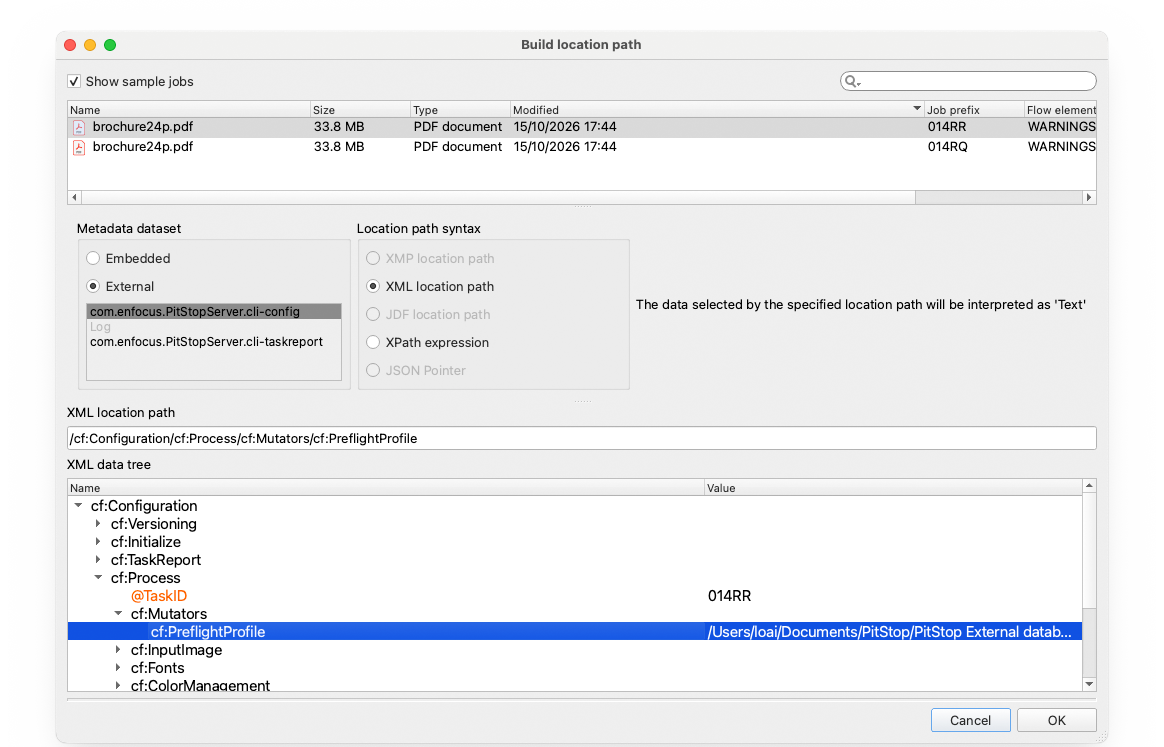
Accessing the PitStop Server troubleshooting datasets within Enfocus Switch.
These datasets are intended for troubleshooting and diagnostics. They help you investigate issues when developing, testing, or maintaining a Switch flow.
Disable troubleshooting datasets when you do not need them
The overhead of generating troubleshooting datasets may seem small for a single job. However, in high-volume production environments, that overhead can add up over time.
When you are troubleshooting a Switch flow or investigating PitStop Server issues, these datasets provide valuable diagnostic information. Once the flow is stable and running as expected, you may no longer need them.
PitStop Server includes an "Add troubleshooting datasets" option. By default, this option is enabled. As a result, PitStop Server generates both troubleshooting datasets for every processed job.
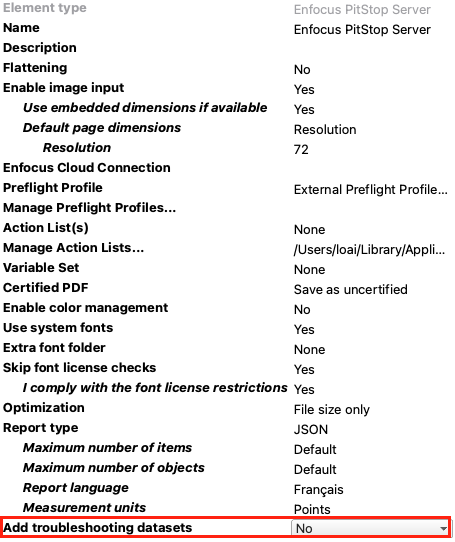
The PitStop Server app in Switch provides an option
to disable troubleshooting datasets.
If you disable this option, PitStop Server no longer generates these datasets. This can reduce memory usage and processing overhead, which may help improve throughput in some environments.
Conclusion
The "Add troubleshooting datasets" option is easy to overlook, but it can make a difference in high-volume production environments.
If your Switch flow is stable, consider disabling troubleshooting datasets to reduce unnecessary overhead. If you need to investigate issues or test flow changes, enable them again to access the diagnostic information provided by PitStop Server.