What's new in Griffin
Portuguese language support
Released in Griffin 26.07 on July 7, 2026
See release notes
This release brings full support for Portuguese, along with a number of bug fixes and performance improvements to enhance overall stability and usability.
Griffin now also available in Chinese
Released in Griffin 26.03 on March 24th, 2026
See release notes
This update expands language support with the addition of Simplified Chinese, alongside English, Italian, Spanish, French, German, and Japanese.
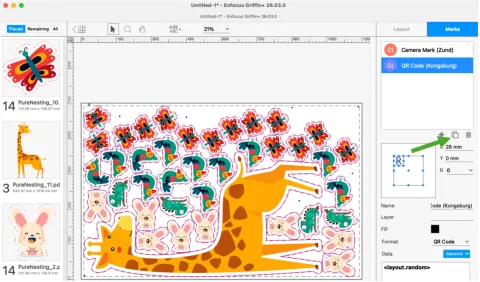
Other improvements include Griffin Auto API additions and usability enhancements to marks, with new options to duplicate live marks and mark presets, further simplifying layout adjustments.
Compatibility with Kongsberg cutting tables
Released in Griffin 25.11 on November 4, 2025
See release notes
The update also brings full support for Kongsberg’s underside camera technology, which is essential for specialised cutting applications requiring perfect alignment from beneath the substrate. Griffin now includes dedicated camera marks that support these complex tasks while also improving efficiency by automating the workflow.
Support for user units
Released in Griffin 25.11 on November 4th, 2025
See release notes
Griffin now provides support for user units, that enable users to import artworks at the correct real-world scale. This eliminates previous limitations tied to the PDF format size, enabling users to trust the accuracy of their layouts without the guesswork and misinterpretations that may cause preflight errors and material waste.
Introduction of Griffin+
Released in Griffin 25.07 on September 16, 2025
See release notes
Griffin+ delivers a high-performance, futureproof platform for signage and wide-format printers with extended functionality to meet the complex demands of busy print environments. Griffin+ supports up to 500 unique products and accommodates print jobs up to 50 metres in length, a fivefold increase over Griffin, while introducing advanced reporting options including PDF, XML, JSON, and tiling reports to ensure enhanced visibility and control.
Replacement for i-cut Layout
Released in Griffin 25.03 on March 25th, 2025
See release notes
Griffin now features waste dividers and supports the generation of Kongsberg JDF files, meaning it can replace Esko’s i-cut Layout software.
Performance improvements
Released in Griffin 24.11 on November 5, 2024
See release notes
Griffin 24.11 includes many under-the-hood enhancements to improve overall stability and performance. This results in less waste and in a more accurate, higher quality PDF rendering in Griffin.
Waste dividers
Released in Griffin 24.11 on November 5, 2024
See release notes
Griffin 24.11 has added waste divider marks to help digital cutting table operators manage board waste. The feature can be fully automated via Griffin Auto’s REST API, making integration of waste management into automated workflows easier than ever.
Fotoba marks
Released in Griffin 24.11 on November 5, 2024
See release notes
Wide format customers can now benefit from the introduction of Fotoba marks for vertical and horizontal bars needed to operate Fotoba cutting devices. Users can customize the settings and automate the process via the REST API.
Open in editor
It's now possible to edit your files in the native application without leaving Griffin. For PDF files, this also means that 1-Up files can be sent to PitStop Pro to add bleed, create cut paths, perform preflight or use any other PitStop feature before simply saving to update automatically to Griffin.
Dedicated Onyx RIP export
Griffin now provides a dedicated workflow for Onyx users, offering seamless integration with Onyx RIPs.
Looking for all Griffin updates?
Check out the Griffin release notes.