What's new in PitStop Pro
Protected Mode support in PitStop Pro
Released in PitStop 26.07 on July 7, 2026
See release notes
Adobe Acrobat Protected Mode is a built‑in security feature designed to help protect computers from potentially malicious PDF files. To support security‑sensitive workflows, and to help users anticipate potential future changes in Acrobat behavior, Enfocus is introducing full support for Protected Mode in PitStop Pro 26.07. Click here to read more about Protected Mode support in PitStop Pro.
Distributing along path
Released in PitStop 26.03 on March 24, 2026
See release notes
PitStop 26.03 introduces a new "Distribute along path" Action, allowing objects to be distributed precisely along irregular shapes instead of being limited to page‑based distribution. A common example is placing grommets evenly along a banner contour.
Variables in dropdowns
Released in PitStop 26.03 on March 24, 2026
See release notes
PitStop 26.03 extends support for variables in dropdowns to Preflight Profiles, allowing checks to be configured dynamically for greater flexibility in automated workflows.
Improved Preset Manager
Released in PitStop 26.03 on March 24, 2026
See release notes
In PitStop 26.03, the improved Preset Manager makes it easier to find, sort, and manage Presets thanks to customizable columns and enhanced search.
My PitStop
Released in PitStop 26.03 on March 24, 2026
See release notes
My PitStop is a central panel in PitStop Pro that gives users quick access to helpful resources and insights, such as Botus (the AI chatbot), dashboard insights, documentation, use cases, feature requests, training content, and support... all in one place, directly within the application.
Botus
Released in PitStop 25.11 on November 4 2025
See release notes
Enfocus Botus is an AI-powered chatbot that supports users in making the most out of PitStop’s many useful features.
Improved layer handling
Released in PitStop 25.11 on November 4, 2025
See release notes
The new Layer properties panel in the Enfocus Inspector enables more efficient layer editing by offering an overview of all layers and their properties.
Detecting thin parts
Released in PitStop 25.11 on November 4 2025
See release notes
Checking for thin parts is no longer limited to strokes and filled rectangles. From now on, you can also detect small shapes and areas, helping you catch potential print issues early and achieve high-quality results.
Adding multiline text
Released in PitStop 25.07 on July 15, 2025
See release notes
It's now possible to add text spread over multiple lines to a PDF, thanks to the improved 'Add object - Text' Action, which now supports multiline input. Additionally, multiline text can now also be used in variables, as explained in the video.
Optimizing cut and crease lines
Released in PitStop 25.07 on July 15, 2025
See release notes
The Remove concealed segments from line art Action allows PitStop users to detect and delete duplicate lines, which is a critical process for digital cutting and die-cutting preparation.
Copy-pasting attributes
Released in PitStop 25.07 on July 15, 2025
See release notes
Pitstop 25.07 introduces a powerful new capability to copy and paste attributes between objects’ selections in an Action List, providing even greater flexibility when modifying PDF objects’ properties. This enhancement allows our users to change selections’ attributes like a fill colour or a used font for a text, using any reference object.
Comparing gamuts
Released in PitStop 25.03 on March 25, 2025
See release notes
This tool enables users to identify potential color conversion issues before they occur, ensuring accuracy and improving efficiency.
Resource syncing in PitStop Server
Released in PitStop 25.03 on March 25, 2025
See release notes
25.03 also brings resource syncing for PitStop Server subscribers, making it easy to share resources between PitStop Pro and PitStop Server instances. This means that any changes to Action Lists or Preflight Profiles are propagated across an organization, ensuring uniformity across the print production process.
Disable Actions
Released in PitStop 25.03 on March 25, 2025
See release notes
For easier debugging, it's now possible to disable individual Actions in Action Lists.
Content extraction
Released in PitStop 24.11 on November 5, 2024
See release notes
Add pages with extracted content is a new Action for easily separating print content from technical elements such as foil, varnish, or cut paths, and placing them on a dedicated page. This improves efficiency for tasks that involve embellishment or cutting.
Separations
Released in PitStop 24.11 on November 5, 2024
See release notes
The Add separation pages to document Action enables users to generate color separations from a PDF and insert them into the document. It's particularly useful for processes like screen printing or die engraving where separations are essential.
Resource Syncing
Released in PitStop 24.07 on July 2, 2024
See release notes
Resource Syncing allows PitStop Pro subscription users to synchronize their preferred Preflight Profiles and Action Lists with Enfocus Cloud. This ensures that teams across separate locations always work with up-to-date versions of Preflight Profiles, Action Lists, Variable Sets, and Colors, promoting consistency and simplifying disaster recovery.
Change Object Browser Display Order
Released in PitStop 24.07 on July 2, 2024
See release notes
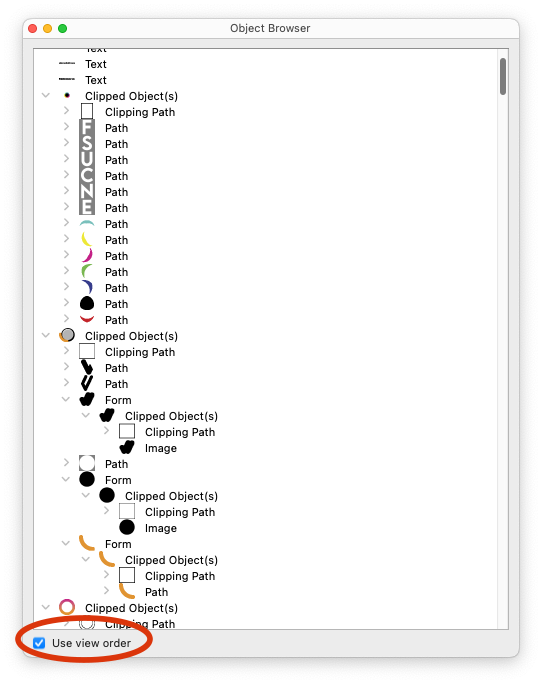
The Object Browser panel now includes an option to change the display order of objects, allowing users to view them from top-most visible to lowest visible, or vice versa. This makes it easier to select and manipulate specific objects within a PDF.
Convert fill to stroke
Released in PitStop 24.03 on March 25, 2024
See release notes
A typical pain point in cutting is when the cut lines are converted into a shape and are no longer usable as cut lines in production. PitStop's new, patent-pending, "Fill to Stroke" feature solves this challenge, by reverting the incorrectly converted shape to its original cut path.
Simplify path
Released in PitStop 24.03 on March 25, 2024
See release notes
PDF renderers, RIP engines and cutting devices often struggle with line art objects that consist of a large number of nodes. Thanks to the new 'Simplify line art' Action in PitStop 24.03 you can reduce the number of nodes without changing the visual appearance of the path.
Looking for all PitStop Pro updates?
Check out the PitStop Pro release notes.